
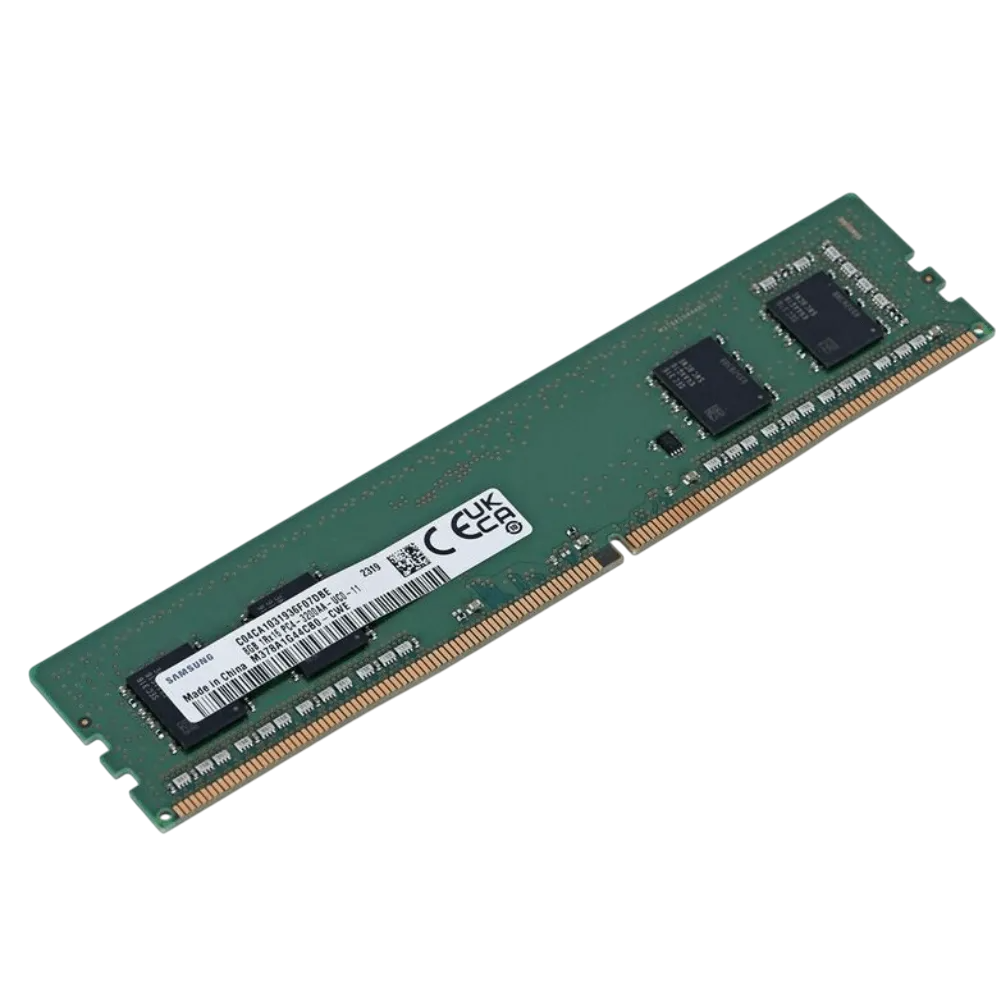
8GB PC4 Desktop RAM – DDR4 DIMM Memory
Original price was: KSh 6,000.KSh 4,000Current price is: KSh 4,000.
- Stock
- In stock
- Delivery
- Same day in Nairobi, countrywide by courier. Fee confirmed when you order.
- Returns
- 7-day returns on faulty or wrong items
- Bench-tested and slot-tested before dispatch
- Pay by M-Pesa, card or bank
Product details
8GB PC4 Desktop RAM
8GB PC4 Desktop RAM is a DDR4 DIMM memory module designed for compatible desktop computers. It can be used to increase available system memory or replace an existing compatible module.
With an 8GB capacity, this memory is suitable for everyday applications, office work, web browsing, business software, and general multitasking on supported computers.
Specifications
- Memory Capacity: 8GB
- Memory Type: DDR4 / PC4
- Form Factor: DIMM
- Compatibility: Supported desktop computers
- Application: Desktop memory upgrade or replacement
What Is PC4 Desktop RAM?
PC4 is a designation associated with DDR4 memory technology.
Desktop DDR4 memory commonly uses the DIMM form factor and must be installed in a motherboard that supports the appropriate memory generation and specifications.
The complete module specifications should always be checked because PC4 memory can be available in different speeds and configurations.
What Can an 8GB RAM Module Be Used For?
A compatible 8GB DDR4 module can provide additional system memory for activities such as:
- Office applications
- Web browsing
- Business applications
- Document processing
- General multitasking
- Everyday desktop computing
It can also be used as a replacement for compatible existing memory or as an upgrade where the motherboard supports additional RAM capacity.
How Can Additional RAM Help a Desktop Computer?
RAM stores data that the computer is actively using.
When a computer has insufficient memory for its workload, increasing the available RAM can help it run multiple applications more efficiently and reduce its reliance on slower storage for temporary data.
The actual performance improvement depends on the computer’s existing memory, processor, storage, operating system, applications, and workload.
DIMM Memory for Desktop PCs
This module uses the DIMM form factor, which is commonly used in desktop computers.
Laptop computers typically use smaller SO-DIMM modules, so desktop DIMM and laptop SO-DIMM memory should not be treated as interchangeable.
Check your computer’s specifications before purchasing a memory upgrade.
Is This RAM Compatible With My Desktop?
Compatibility depends on your computer’s motherboard and existing memory configuration.
Before purchasing, check:
- DDR4/PC4 support
- Required memory speed
- DIMM compatibility
- Available RAM slots
- Maximum supported memory
- Maximum capacity per slot
- Existing RAM configuration
Matching the correct specifications is important for reliable operation.
Frequently Asked Questions
What does PC4 mean in RAM?
PC4 is a designation associated with DDR4 memory. The complete PC4 specification can also indicate memory bandwidth, so checking the full module label is useful when determining compatibility.
Is PC4 RAM the same as DDR4?
PC4 is part of the naming convention used for DDR4 memory. However, DDR4 modules can have different speeds and other specifications, so compatibility should still be verified.
Is this RAM for desktops or laptops?
This module uses the DIMM form factor and is intended for compatible desktop computers. Laptop computers generally use smaller SO-DIMM modules.
Can I add 8GB RAM to my desktop?
Yes, provided your motherboard supports the required DDR4 memory specification and has an available compatible slot. An existing module may also be replaced where appropriate.
Will adding 8GB RAM make my computer faster?
Additional memory can improve performance when insufficient RAM is limiting the computer, especially when several applications are running. The actual improvement depends on the computer’s current hardware and workload.
Can I use DDR4 RAM in a DDR3 computer?
No. DDR3 and DDR4 are different memory generations and are not interchangeable. Use the memory generation supported by your motherboard.
What should I check before buying desktop RAM?
Check the motherboard’s supported RAM generation, memory speed, DIMM slots, maximum capacity, capacity per slot, and existing memory configuration.
Upgrade Your Desktop Memory
Choose 8GB PC4 Desktop RAM when adding or replacing memory in a compatible DDR4 desktop computer.
Always check the motherboard specifications and existing RAM before purchasing to ensure the module meets your computer’s memory requirements.
Related products
-
Save 23%
 Server RAM
16GB PC4 Server RAM – DDR4 Server Memory
Original price was: KSh 6,500.KSh 5,000Current price is: KSh 5,000.Add to cart Buy on WhatsApp -
 Desktop RAM
4GB PC3 Desktop RAM
Call for priceRead more Buy on WhatsApp -
Save 19%
 Graphics Cards
AMD FirePro W4100 4GB Professional Graphics Card
Original price was: KSh 8,000.KSh 6,500Current price is: KSh 6,500.Add to cart Buy on WhatsApp -
Save 19%
 Graphics Cards
NVIDIA Quadro K4200 4GB Professional Graphics Card
Original price was: KSh 8,000.KSh 6,500Current price is: KSh 6,500.Add to cart Buy on WhatsApp
Reviews
There are no reviews yet.