
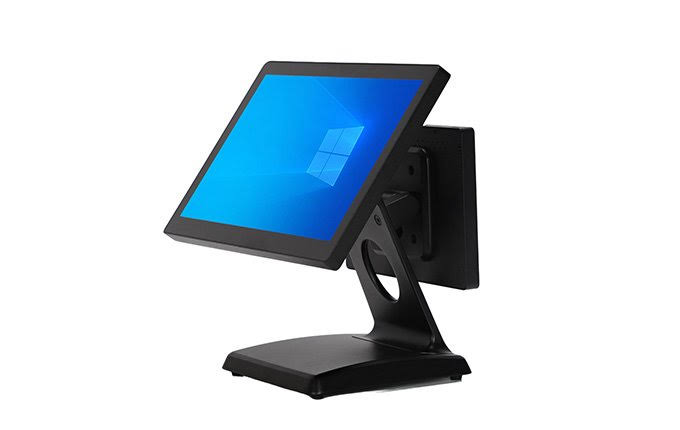
Walk into any busy shop in Nairobi and the till tells you a lot about the business. Where there is a touch-screen POS terminal, a receipt printer and a barcode scanner, queues move faster, stock is counted properly and the owner can see the day’s sales from their phone. This guide explains what a point-of-sale (POS) setup actually is, what the hardware costs in Kenya right now, and how to choose the right kit for a retail shop, restaurant, supermarket, pharmacy or mobile business.
What makes up a complete POS system?
A POS system has two halves: the hardware you can touch, and the software that runs on it. A typical counter setup includes:
- POS terminal — usually an all-in-one touch-screen computer that runs your POS software. It replaces the keyboard-and-monitor desktop at the till.
- Receipt printer — an 80mm thermal printer that prints receipts instantly without ink or toner.
- Barcode scanner — speeds up checkout and keeps stock records accurate. A 2D scanner also reads the QR-style codes used on medicine packs.
- Cash drawer — connects to the receipt printer and pops open when a sale closes.
- POS software — the program that records sales, manages stock and prints the receipt. In Kenya, most businesses now use eTIMS-ready software so invoices flow to KRA automatically.
POS hardware prices in Kenya (2026)
These are PokeTech’s current Nairobi prices. Everything is bench-tested in our workshop before it leaves.
| Item | Price (KSh) |
|---|---|
| All-in-one touch-screen POS terminal (Core i5, 8GB RAM, 256GB SSD, 15.6″ touch) | 45,000 |
| XPrinter 80mm thermal receipt printer | 6,000 |
| Starter counter bundle (terminal + receipt printer) | 51,000 |
| Barcode scanner | Priced on order |
| Cash drawer | Priced on order |
| Handheld Android POS (built-in printer, for deliveries and market stalls) | Quoted on request |
Prices are for new hardware with a warranty that is stated clearly before you pay. If a supplier cannot tell you the warranty terms up front, keep walking.
Hardware and software are bought separately — and that’s a good thing
A common mistake is buying a “POS system” where the hardware is locked to one software vendor. If you later outgrow that software, the hardware goes to waste. The terminals we sell are standard Windows machines: they run the eTIMS-ready POS systems Kenyan businesses already use, and if you ever switch software, the hardware simply keeps working.
Already running software you like? Send its name and requirements to us on WhatsApp and we will confirm compatibility before you order anything.
Choosing by business type
Retail shop or boutique
One all-in-one terminal and a receipt printer cover most shops. Add a barcode scanner once your stock list grows past what the cashier can memorise.
Restaurant or cafe
Start with the counter setup, then add a second 80mm printer in the kitchen so orders print where the cooks are. Waiters stop walking order slips back and forth, and nothing gets lost.
Supermarket or minimart
Plan for a scanner and cash drawer at every till, a weighing-scale connection for fresh produce, and a back-office desktop for stock control and reports.
Pharmacy
Use a 2D barcode scanner — it reads the data-matrix codes on medicine packaging, which a basic 1D scanner cannot.
Mobile and delivery businesses
A handheld Android POS with a built-in printer runs the till from anywhere: boda deliveries, market stalls, gas refills, events.
Five things to check before you pay for any POS terminal
- Capacitive touch screen. It should respond like a smartphone. Older resistive screens need a hard press and slow the cashier down.
- Enough ports. You need USB ports for the printer, scanner and drawer, plus LAN for a stable network. Count them before buying.
- Real specs. For smooth all-day use, aim for a Core i5 processor, 8GB of RAM and an SSD. A slow till is a queue.
- Bench testing. Every unit we dispatch is powered up, tested and loaded with drivers first — ask any seller whether they do the same, or you become the tester.
- A warranty in writing. Know the terms before money changes hands, not after the first fault.
Where to buy a POS system in Nairobi
You can see and test the hardware at the PokeTech walk-in shop: Superior Towers, 2nd Floor, Shop H32, Moi Avenue, Nairobi, open Monday to Saturday, 8:00 am to 5:00 pm. Prefer delivery? We deliver the same day within Nairobi and countrywide by courier, and POS counters are installed and set up on site. Payment is by M-Pesa, card or bank transfer, and we confirm stock and price before you pay.
Ready to kit out your counter? See the all-in-one POS terminal and starter bundle here, browse all POS hardware, or message us on WhatsApp (+254 112 987 378) and tell us what kind of business you run — we will recommend exactly what you need, and nothing you don’t.